How the Instagram Reels algorithm works, according to Instagram
Instagram has explained Reels ranking more openly than most platforms. In its ranking explainer, Adam Mosseri wrote that Reels are built to help people discover new things, with an emphasis on entertainment. The system predicts how likely someone is to reshare a Reel, watch it all the way through, like it and visit its audio page. It weighs, in order, the viewer's recent activity, their history with the poster, the Reel itself (audio, visuals, popularity) and the poster's popularity.
New Reels are tested in stages. Instagram's February 2025 creator post says a Reel goes first to a small group of non-followers likely to enjoy it, then to bigger audiences if it performs, judged on signals such as watch time, retention, shares, likes and comments. In a January 2025 video, Mosseri named the top three ranking signals as watch time, likes and sends, and said sends are slightly more important for reaching people who don't follow you, while likes matter slightly more with your followers (reported by Social Media Today).
For a founder, that splits the job in two. Sends bring in strangers, the people who will one day buy. Watch time and likes keep your followers seeing you, which warms them up before the launch. A Reel that gets sent but leads nowhere grows a number. A Reel that leads to your list grows a business.
Reels specs and the rules that limit recommendation
Growth comes from reach to non-followers, and Instagram publishes why a Reel stops being recommended. Check every Reel against this, and your account before launch week.
| Item | What Instagram or Meta says | What to do |
|---|---|---|
| Aspect ratio and size | Meta's Reels specs list 9:16 at 1440 x 2560, MP4 or MOV | Shoot vertical and export at full resolution. |
| Safe zones | Keep the top 14%, the bottom 35% and 6% on each side free of text and logos | Put on-screen text and your CTA in the middle band, where the username, caption and buttons can't cover them |
| Length | Reels shown to non-followers should be 3 minutes or less | Keep the reach version under 3 minutes. Save deep teaching for your email list. |
| Watermarks | Low-resolution or watermarked Reels are made less visible | Export a clean file from your editor, never a download from another app |
| Reposts | Reels already posted on Instagram, and accounts that mostly reshare other people's content, are less likely to be recommended | Post original footage. Use Remix if you want to react to someone else's Reel. |
| Format | Muted Reels, Reels with borders and Reels that are mostly text are limited | Keep audio on, fill the frame and show a face or the product, not a text slide |
| Engagement bait | Clickbait, engagement bait and contests or giveaways can be limited from recommendations | Ask for the action that fits the Reel. Don't make "comment to win" the point of it. |
| Account status | Instagram's reach tips tell creators to check Account Status | Check it monthly and before any launch, and fix flagged posts early |
Sources: Instagram's ranking explainer, creator FAQ and reach tips. Safe zones are from Meta's Reels ad specs; we use the same margins for organic Reels.
A Reel structure that holds attention and gets sent
Instagram's creator team says to make the first three seconds engaging and to make Reels a new viewer understands without context. We build growth Reels in six beats.
0 to 3 seconds: the hook
Show the result, the problem or the claim in the first frame, with on-screen text inside the safe zone. No logo intro. Instagram's insights show how many viewers stay past 3 seconds, so this is the first number you'll fix.
3 to 10 seconds: the context a stranger needs
Most viewers don't follow you yet. Say who this is for and why you can speak to it: "I built a budgeting app, and this is the mistake I see most." It also tells them what your account is about.
The middle: one idea, delivered fast
One tip, one demo or one story. Cut every pause. Watch time is a top signal, and a viewer who reaches the end is the one most likely to tap your name.
The send trigger
Give the viewer a reason to send it to one person: a mistake their friend makes, a tool their cofounder needs. Sends carry the most weight with non-followers, so write for the forward.
The next step
End with one action that moves the viewer down the funnel: follow for part 2 of the series, or get the free resource at the link in bio. Match the offer to the Reel. A Reel about pricing a course should point to a pricing checklist, not a general newsletter.
Caption, keywords and audio
Instagram's reach tips say to use relevant keywords in the content, caption and hashtags, and its creator team says audio can help Reels reach new people. Write the caption as a searchable sentence that names the topic.
How often to post Reels: a 6-week plan that ends in a launch
Instagram's creator FAQ says creators with the highest net follower growth post 10 or more Reels a month on average. For a launch, plan backward from the date so each week switches on the next funnel step. If your account has trial reels, use them for new hooks: they go to non-followers first, stay off your grid, show metrics after about 24 hours and can be shared to your followers automatically if they perform in the first 72 hours.
| Weeks | Reels a week | What you post | Funnel step you switch on |
|---|---|---|---|
| 1 to 2 | 5 to 7 | Hook tests on your core topic, with new angles posted as trial reels | Profile rewritten around one promise; link-in-bio page live |
| 3 to 4 | 5 to 7 | More of your two best formats, plus a numbered series that follows the product being built | Free resource and email signup; three pinned posts |
| 5 | 5 to 7 | Behind the scenes, objections answered, early results from testers | Waitlist with a launch date and a reason to join early |
| 6 (launch) | 7 or more | Demos, proof and answers to the questions buyers ask in comments and DMs | Launch emails to the list; checkout open; Stories for the daily push |
Five to seven Reels a week is our planning number for a launch push, not an Instagram rule. At 3 or 4 a week, stretch it to 8 or 10 weeks.
Case study: a new product launch
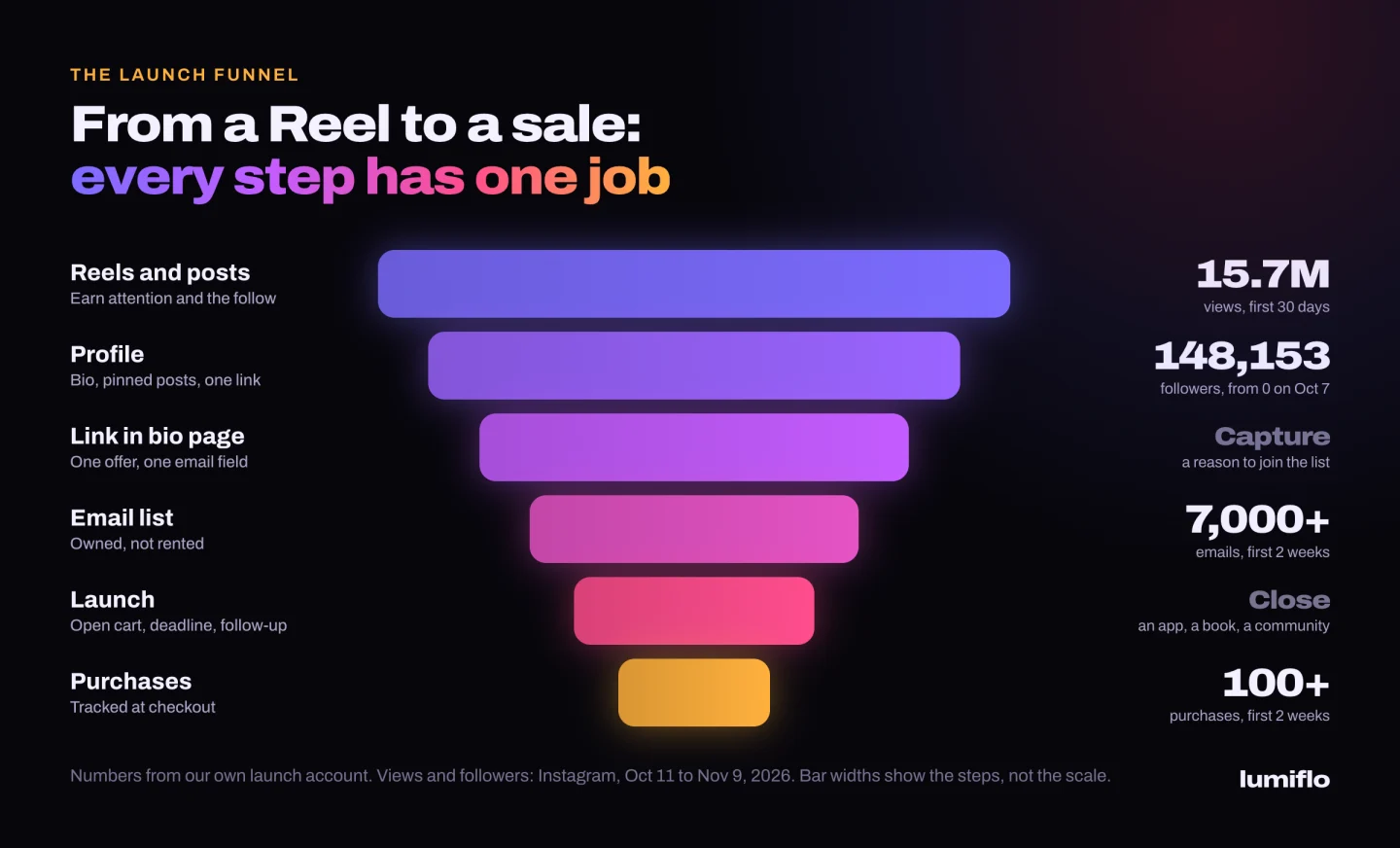
We launched a new product. In 2 weeks, these are the results.
- 115kfollowers, starting from zero
- 7,000+emails collected
- 100+purchases across an app, a book and a paid community
No audience, no list and no sales on day one. Organic content earned the follow, a landing page captured the email, and three offers closed the sale. Read the case study.
How to turn Reels views into followers, and followers into an email list
A viewer who likes one Reel taps your name and decides in seconds whether to follow. The profile should answer one question: what do I get if I stay? For the list itself, see our guide to building an email list as a creator.
A name field and bio that state the payoff
Put the topic in the name field and the promise in the bio, plus one line on the free thing at the link. "Building a budgeting app in public. Free 7-day money reset below."
Three pinned posts with three jobs
Instagram lets you pin up to three posts or Reels to the top of your profile. Pin a start-here Reel that explains who you are, part 1 of your series, and the Reel that sells your free resource best.
A series that gives people a reason to follow
One Reel earns a view. "Part 4 of building my course in public" earns a follow, because the viewer wants part 5. Number the series in the hook and on the cover, and aim it at the launch: the last episode is the launch.
One link, one action
The link in bio goes to a page with one job: the email signup for the free resource, then the waitlist. Our creator sales funnel guide covers the page and the emails behind it.
CTAs that match the Reel
Say the offer out loud in the Reels that perform and repeat it in the caption, tied to that Reel's topic. "Link in bio" on its own gets ignored. "The template from this video is free at the link" gets taps.
Emails that build to the launch
The first emails deliver the freebie, tell your story and name the problem your product solves, so subscribers know what's coming. Our guide to launching a digital product covers the launch sequence step by step.
How to read Instagram Insights for Reels
Open any Reel and tap View insights. Read the numbers in funnel order, and compare each Reel with your own median, not with someone else's account.
| Metric | What it tells you | What to change if it's weak |
|---|---|---|
| Views | How far Instagram widened the test | Low across many Reels: check Account Status, then your hooks. |
| Retention past 3 seconds | Instagram points creators to the watch percentage in insights to see how many viewers keep watching after 3 seconds. Meta's Edits app also shows skip rate. | Rewrite the first line and the first frame. Test the new opening as a trial reel. |
| Average watch time | The average time spent playing the Reel, per Instagram's definition | Cut the slow middle, move the payoff earlier, shorten the Reel |
| Sends per reach | Shares as a share of accounts reached. Mosseri told creators to watch it, and sends matter most with non-followers. | Give a clearer reason to forward: a named audience, a common mistake, a tool |
| Likes per reach | How much the people who saw it enjoyed it; slightly more important with followers | If followers stop liking, you've drifted from the promise they followed for |
| New followers from the Reel | Instagram notifies you when a Reel brings in new followers | High views with few follows means the Reel doesn't connect to your profile. Fix the CTA or start a series. |
| Signups and sales (in your email tool and checkout) | Whether reach is turning into revenue | Log signups by day and note which Reel ran. This is the number that decides what you make next. |
Metric names shift as Insights changes. Mosseri's shortlist is average watch time, likes per reach and sends per reach.
Reels growth mistakes that stall a product launch
- Chasing broad trends that win views from people who will never buy. You need the right strangers, not the most.
- Reposting a Reel that flopped. Instagram limits Reels already on Instagram, so make a new version with a different hook and test it as a trial reel.
- Ending every Reel with "comment GUIDE and I'll send it". Instagram can limit engagement bait. Use it on Reels where the guide is the natural next step.
- Starting the email list in launch week. The list is what you launch to; launch-day views are a bonus.
- Running launch week on the same Reels as always. Buyers need a demo, proof, the price and the date.
- Judging the push on follower count. You can't email a follower on launch day.
Instagram Reels growth is the top of the funnel. The launch is where it pays.
Our own launch account on Instagram had 0 followers on October 7, 2026. From October 11 to November 9 it got 15,720,857 views and reached 148,153 followers, a net gain of 142,062. The launch collected 7,000+ emails and 100+ purchases across an app, a book and a paid community. The dashboards are in our case study.
That's what a Reels push looks like when it pays off: reach first, then a profile, a page, a list and a product to sell. If you want a team to run it, our Instagram growth agency plans and makes the Reels and builds the funnel behind them. For founders and creators with an offer we believe in, we can work on a revenue share: a lower upfront fee plus a share of the sales we help create.
Still deciding what to sell? Start with how to make money on Instagram. For a brand-new account on several platforms, use our 30-day plan for growing from zero. For paid ads and creator partnerships, see our Instagram marketing agency page.